
Memasang 'Read More'
Friday, July 11, 2008
1. Dalam halaman TEMPLATE tekan tulisan Edit Html. Jangan lupa Tick Expand Widget Template.
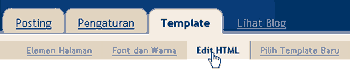
Cari kata "post-header-line" lalu tambahkan kode berikut yangberwarna merah :
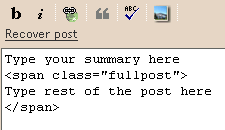
2.Masih di dashboard, klik Settings > Formatting dan perhatikan bahagian paling bawah yang menunjukkan "Post template", lalu isikan kod berikut disana.
Type your summary here
<span class="fullpost">
Type rest of the post here
</span>
Kod diatas digunakan untuk memudahkan anda menbuat postingan. Jadi tak lah anda asyik taip kod sama je setiap kali menbuat postingan
Email this post
Cari kata "post-header-line" lalu tambahkan kode berikut yangberwarna merah :
<div class='post-header-line-1'/>
<div class='post-body'>
<b:if cond='data:blog.pageType == "item"'>
<style>.fullpost{display:inline;}</style>
<p><data:post.body/></p>
<b:else/>
<style>.fullpost{display:none;}</style>
<p><data:post.body/></p>
<a expr:href='data:post.url'>Read More......</a>
</b:if>
<div style='clear: both;'/> <!-- clear for photos floats -->
</div>
2.Masih di dashboard, klik Settings > Formatting dan perhatikan bahagian paling bawah yang menunjukkan "Post template", lalu isikan kod berikut disana.
Type your summary here
<span class="fullpost">
Type rest of the post here
</span>
Kod diatas digunakan untuk memudahkan anda menbuat postingan. Jadi tak lah anda asyik taip kod sama je setiap kali menbuat postingan




0 comments: to “ Memasang 'Read More' ”
Post a Comment